Using smart features on an LG refrigerator transforms it from a basic appliance into a central smart hub for your kitchen, offering remote control, energy savings, and proactive maintenance. These features are primarily managed through the LG ThinQ app, which connects your smartphone to the refrigerator, enabling monitoring and control from virtually anywhere. For example, you can adjust temperatures or activate special modes like Ice Plus remotely, enhancing convenience and food preservation.
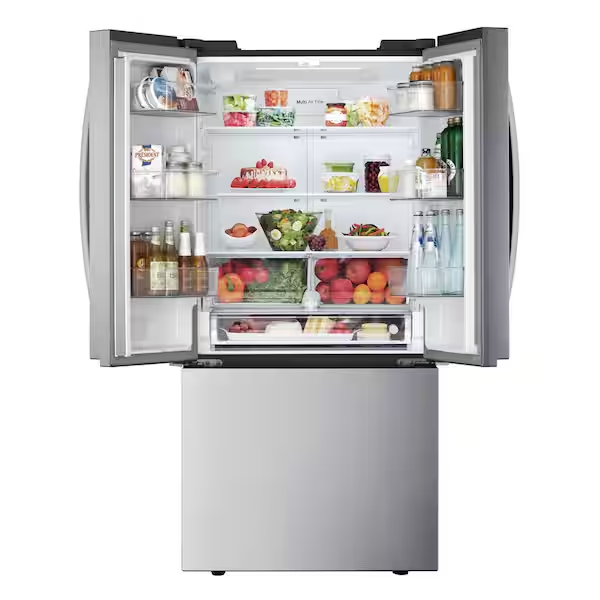
First Things First: What is LG ThinQ and Why Should I Care?
Before we dive into the cool tricks, we need to talk about the brain behind the operation: the LG ThinQ app. Think of this app as the universal remote for your smart LG appliances. It’s the bridge that connects your smartphone to your refrigerator, allowing you to monitor and control it from virtually anywhere. For compare top refrigerator sales on this site.
Why care? Picture this: you’re at the grocery store, staring at a carton of milk, and you can’t for the life of you remember if you have any left at home. Instead of guessing, you can simply check your fridge’s inventory on your phone (on select models). That’s the kind of everyday convenience we’re talking about. Connecting your fridge is the crucial first step to using smart features on an LG refrigerator effectively.
How Do I Connect My LG Refrigerator to Wi-Fi?
Getting connected is a straightforward process. Here’s a quick step-by-step guide to get you up and running:
- Download the App: Head to the Google Play Store or Apple App Store and download the free “LG ThinQ” app.
- Create an Account: Open the app and sign up for an LG account. It’s quick and painless.
- Add Your Appliance: Tap the ‘+’ button to add a new device. The app will guide you to select “Refrigerator.”
- Connect to Wi-Fi: On your refrigerator’s control panel, press and hold the Wi-Fi button for 3 seconds until the icon starts blinking.
- Follow App Instructions: The ThinQ app will then find your refrigerator. You’ll be prompted to enter your home Wi-Fi password to complete the connection.
And that’s it! You’ve just opened up a new world of possibilities.
Mastering the Most Useful LG Smart Refrigerator Features
Now for the fun part. Your LG fridge is packed with technology designed to make your life easier, save you money, and keep your food fresher for longer. Let’s break down the features you’ll actually use.
Remote Temperature Control
This is one of the most practical features. You can adjust the temperature of both the fridge and freezer compartments directly from the ThinQ app.
- Going on a big grocery run? Lower the temperature a few degrees an hour before you get home to rapidly cool your new groceries.
- Heading out on vacation? You can activate ‘Vacation Mode’ to save energy while you’re away.
Ice Plus and Express Freeze
Bảng trống.Ever had unexpected guests and realized you’re low on ice? Or needed to freeze something quickly?
- Ice Plus: This feature cranks up ice production for a 24-hour period. You can activate it from the app on your way home from work so you have a full bin ready for evening drinks.
- Express Freeze: This function rapidly drops the freezer’s temperature, which is perfect for freezing fresh meats or locking in the flavor of homemade ice cream.
Smart Diagnosis and Proactive Customer Care
Worried about your refrigerator acting up? LG’s smart features take the guesswork out of troubleshooting.
- Smart Diagnosis: If you notice an issue, you can run a diagnosis through the ThinQ app. The refrigerator will transmit data to your phone, providing you with troubleshooting steps or information to give to a service technician. It’s like having a mechanic on call.
- Proactive Customer Care: This is even cooler. Your fridge can analyze its own usage patterns and send you alerts before a problem occurs. You might get a notification about potential airflow issues or a reminder to change your water filter.
“Proactive alerts are a major upgrade. We see far fewer emergency calls from customers with connected appliances because the fridge often identifies a potential issue, like an accidentally blocked vent, and the owner can fix it themselves in seconds.” – David Chen, Senior Home Appliance Engineer
The Door-in-Door and InstaView Advantage
While not strictly app-based, these physical features are a core part of LG’s smart design philosophy. The InstaView Door-in-Door lets you knock twice on the glass panel to see what’s inside without opening the door.
Why is this a “smart” feature? Every time you open the main refrigerator door, you lose a significant amount of cold air, forcing the compressor to work harder (and use more energy) to cool it back down. By using the InstaView and the smaller Door-in-Door compartment for frequently accessed items like drinks and snacks, you drastically reduce cold air loss. This simple act saves energy and keeps the food inside at a more stable temperature.
Making the Most of Using Smart Features on an LG Refrigerator
Knowing the features is one thing; integrating them into your daily life is another. Here are some real-world scenarios where these smart capabilities truly shine.
- The “Forgot to Close the Door” Lifesaver: We’ve all done it. You grab a drink, get distracted, and leave the door slightly ajar. Instead of coming home to a warm fridge and spoiled food, the ThinQ app will send a Door Alarm notification to your phone after a few minutes, letting you call a family member at home to close it.
- The Energy Saver: The app tracks your refrigerator’s energy consumption. You can see how your habits, like frequent door openings, affect your energy bill. This awareness can help you make small changes that lead to real savings.
- Voice Control Integration: You can connect your LG ThinQ account to Amazon Alexa or Google Assistant. This allows for hands-free control. While you’re cooking with messy hands, you can simply say, “Hey Google, ask LG to turn on Ice Plus.”
Frequently Asked Questions (FAQ)
Here are some common questions people have when first using smart features on an LG refrigerator.
Q: Do I need to have my phone on the same Wi-Fi network to control my fridge?
A: No, you don’t! Once the refrigerator is connected to your home Wi-Fi, you can control it from anywhere in the world using the ThinQ app, as long as your phone has an internet connection (Wi-Fi or cellular data).
Q: What happens if my Wi-Fi goes down?
A: Your refrigerator will continue to function perfectly as a normal, non-smart refrigerator. You just won’t be able to use the remote features in the ThinQ app until your Wi-Fi connection is restored.
Q: Are all LG refrigerators smart?
A: Not all of them, but a growing number of new models come with ThinQ technology. When shopping, look for the “LG ThinQ” or “Smart Wi-Fi Enabled” logo to be sure. Check out our guide to the best LG refrigerators to see our top smart picks.
Q: Is the LG ThinQ app secure?
A: Yes, LG uses robust security protocols to protect your account and data. It’s always a good practice to use a strong, unique password for your account, just as you would with any other online service.
Q: Can more than one person in my family control the refrigerator?
A: Absolutely. You can invite family members to your “LG Home” within the ThinQ app. This allows them to download the app, log in, and have access to the same smart features.
The Takeaway: Your Refrigerator, But Smarter
Embracing the world of smart appliances doesn’t have to be intimidating. At its core, using smart features on an LG refrigerator is about adding layers of convenience and efficiency to your daily routine. It’s about preventing problems before they start, saving energy without even thinking about it, and having one less thing to worry about. So go ahead, connect your fridge, explore the ThinQ app, and start letting your kitchen’s smartest appliance work for you. You’ve invested in the technology—now it’s time to enjoy the benefits.
Get our weekly buyer guide
Practical specs, not advice. Unsubscribe anytime.
I absolutely love the proactive maintenance alerts from our LG smart fridge. It’s so helpful to get a notification if something needs attention before it becomes a big problem. This feature alone gives me peace of mind and makes me feel like I’m getting the most out of my appliance investment. Highly recommend!
I was skeptical about smart features on a fridge, but the LG ThinQ app has been a game-changer. Being able to adjust the temperature or turn on Ice Plus when I’m at the grocery store is surprisingly useful. It really does make the kitchen feel more connected and modern. Definitely worth it for the convenience alone.
The smart hub concept is cool, and I do use the LG ThinQ app for basic things like checking the filter status. However, I find some of the more advanced features a bit clunky to set up. It’s not as intuitive as I hoped it would be, and I often forget to use them. Still, it’s a solid fridge overall.
Our new LG refrigerator with smart features has been great, especially the remote monitoring. I like being able to check if the door is closed when I’m out, which has saved us from potential food spoilage a couple of times. The energy savings aspect is also a nice bonus, though I haven’t tracked it super closely yet.